Blogging Robots

Introducing Video Mémoires

August 17, 2010 by Dmitry

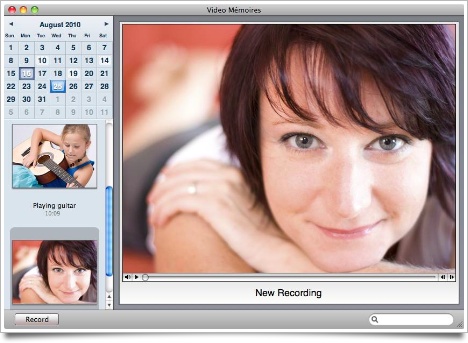
We are happy to announce our new product, Video Mémoires, a video diary software for Mac. It is easy to use, and have the recognizable Mémoires interface.

Video Mémoires screenshot

Learn more and download a free trial version here.

Liked this post? Subscribe to RSS feed (or by email) and get more.

21 Responses to “Introducing Video Mémoires”

  1. Joseph

    Hello Coding Robots!

    This looks good, but why does it need to be a separate application? Can these features not be integrated into Mémoires?

  2. Dmitry

    I thought about this a lot, but with how Mémoires handles journals (one separate file per journal), it cannot be integrated (or it would be too slow). Also, it’s simpler this way.

  3. Will England

    I learned about your company from the Slashdot article about your Non-Takedown of a torrent. Funny!

    While I’m not in need of a journaling program, I am in need of this Video Memories program, and will be purchasing a full licenses - strictly because of your amazing sense of humor and rant on TPB.

    Well done, sir, well done!

  4. Will England

    And purchased!

    Review: That is just what you need for a fast, light and functional video journal. Nice clean interface, no preferences to set, it just does what I want it to. Record, edit title, play back.

    Note: If you change sound input (line in to internal, etc) you need to restart the software. Note: To delete a recording, just whack CMD-Delete on the keyboard.

    Suggestion: Display audio level indicator in the recording window.

    Could also use some documentation. :-)

    Question:

  5. Dmitry

    Will: thanks for purchasing it and for your feedback!

  6. Christine

    Thanks to Will England for the tip about deleting. I like the simplicity, too.

    I bought this to help me practice speaking my thoughts coherently on the fly.

    And hey, if Star Trek and Avatar characters can make visual log entries, I should be able to, too, right? :-)

  7. Will England

    I liked how the guy did it on the Avatar movie; seems like a good idea.

    Question: What does it do with the recorded files? Where do they get stored? I want to be sure it gets backed up, archived, burned off to disc and more.

    Thanks!

  8. Dmitry

    Will, index and records are stored in ~/Library/Application Support/Video Mémoires/ — just backup this folder.

  9. Johnas

    Hi, I’ve had Memoires for a while now and love it! Just got Video Memoires and love it too! But where you said the recorded files are stored are not there. I tried searching my entire computer but it’s not there. I’m moving files to a new computer and I want to take my video files that I’ve already made onto the new computer. What should I do?

  10. Dmitry

    Perhaps, you looked for it in the root Library folder instead of your account’s home folder? Try going to your home folder, then selecting Library/Application Support/Video Mémoires/ (or, in Finder, click Go > Go To Folder and copy and paste ~/Library/Application Support/Video Mémoires/).

  11. Johnas

    Ah, well done! Thank you so much! Love the product. And will be recommending to everyone.

  12. lucy

    Hi I have tried your Video memories programme on a friend’s computer It is so easy and straightforward to use. I would love to have it on my laptop but I have no job or spare money so I cannot which is a shame. I wish all software just did what it’s supposed to and not have loads of other rubbish on it that you never use

  13. Bob

    Just caught up with this super app via the appstore.

    As others have said - so easy to use. As someone who has never kept a video diary, this app akes it so possible - just record your diary after checking your mail!

  14. Alberto

    Is there any chance the app will let us upload our own videos? I kinda prefer my camera to the webcam.

  15. Dmitry

    @Alberto: yes, this feature is planned.

  16. HBDance

    I am interested in this app, but are there security features? Password protection?

  17. Dmitry

    Video Mémoires doesn’t have password protection.

  18. Zeko

    Files in ~/Library/Application Support/Video Mémoires/ are using non-firendly names. For example: 23C1C876-CAAA-4C03-9450-47786EF161B6-12920-000073C95AD61045.mov

    Is it possible to name these files same as we have named it through application. It would be much easier to extract some files from backup later.

    Now it’s impossible to search backup disk for files on specific subject.

    I have purchased this application, and I like the simplicity very much.

  19. Dmitry

    Those names are unique identification numbers used for database indexing and quick access. We can probably add proper titles into the Spotlight comments property of files, so that they can be searchable with Spotlight. Thanks for suggestion!

  20. mac todd

    just purchased this app for my personal video journal. Any plans on expanding and improving video memories. It seems very bare bones. I have listed some features that would be great below:

    1) Password Protection
    2) Emotional Meter or something like that
    3) Weather integration
    4) Tags for repetitive themes
    5) Notes to input diet and exercise, extracurricular, significant events
    6) Different themes or skins
    7) OSX Lion Optimization
    8) Desktop integration (toolbar)
    9) Wallpaper integration
    10) Memory and Space optimization
    11) Hidden folder for videos/journals
    12) multiple user feature
    13) Publishing capabilities
    14) Remote Storage and Access

    I could go on and on, but it would be nice to see some basic features and perks in some updates for clunking down 14.99 on a basic video app that just has a calendar. Seems like I could have just used PhotoBooth or iMovie and saved my videos into a folder and categorized the videos by date. Love the prospect of this application but it needs some serious upgrades and features to be worth me submitting positive feedback and recommending to friends.

  21. Dmitry

    Hello,

    Thanks for your suggestions!

    1) Maybe.
    2) What’s this? Probably not.
    3) No.
    4) Probably.
    5) No — notes are handled by Mémoires.
    6) No.
    7) Yes.
    8) No sure what this means.
    9) No sure what this means, but 100% no.
    10) Everything is already optimized. What other Space optimizations would you suggest?
    11) No.
    12) Probably not. Use different Mac OS X accounts.
    13) Maybe.
    14) No.

Leave a Reply

Blog comments are not for customer support. You can chat with us and other users in our forums.